
How does the schedule work?
Whoever plans puts together the squad of each service and sends it; everyone answers from their own phone, in the Schedule tab. You need a church and a team.
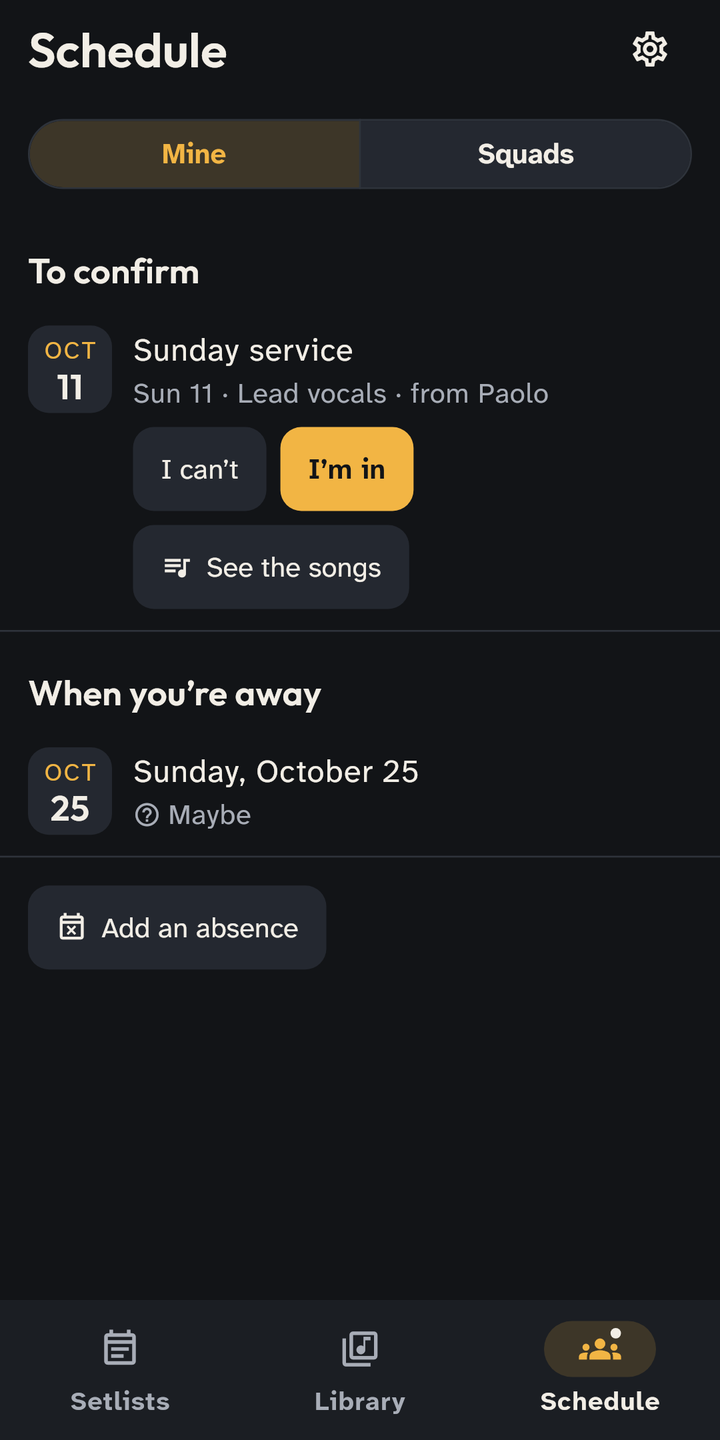
When you are asked
- A new turn arrives as a notification and in the Schedule tab → Mine, under To confirm: the day, your place, who sent it and See the songs.
- Answer I’m in or I can’t. With “I can’t” you can say why: only whoever plans the squad sees it. If something changes later, I can’t anymore.
- The turns you accepted stay under Upcoming, also offline.
When you’re away
- In Mine tap Add an absence: One day or A period. Under More options there is Maybe: whoever plans sees you as unsure. Unless you say otherwise, you are available.
- If you already have a turn on those days, marking the absence declines it and we tell whoever sent it to you.
When you plan
- On the team’s page, Positions and usual lineup: the places (vocals, guitar, drums…) and who usually takes them. Every service starts from this squad; you change it when needed.
- Schedule → Squads shows the month: for each service “Squad complete”, “Missing: …” or how many proposals are left to send. Find … (for example “Find Guitar”) shows who is free that day, under the empty place.
- Send the proposals sends everyone their turn to confirm. In a setlist’s Squad tab you see who has answered; Remind who hasn’t answered sends the others a reminder.
Notifications
- In Settings → Church and team → Notifications choose what you get: under For me your turns; under If you plan the Squad, that is when someone can’t make it and, three days before, if places are open.
- Reminders is a single row: choose when to be reminded of a turn (two days before if you haven’t answered, the day before if you confirmed) or No reminders.