The whole team,on the same verse.
Who plays on Sunday, what we sing, which verse we’re on: the whole team in one app, from Monday to the last verse. Even without internet.
For Android, iPhone and iPad, in English, German and Italian. The team’s live is free, for good.
- You’re on the squad on Sunday
 Chenaniahnow
Acoustic guitar at the 10 am service. Are you in?
- Giulia can’t make SundayChenaniahnow
Vocals need covering: Marco is free.
- The live session has startedChenaniahnow
Sara is leading the service. Tap to join.
Intro
The name
“Chenaniah, leader of the Levites, was instructor in charge of the music, because he was skillful.”
1 Chronicles 15:22, New King James Version
Chenaniah did not play alone: he prepared and led the others. That is what this app is for: helping those who serve with music arrive prepared, play as one and keep their eyes on worship, not on sheets of paper.
Verse 1
Your paper hymnal, in an afternoon
The hardest step is always the same: bringing years of PDFs, photocopies and notebooks into the app. With «Convert with AI» a photo is enough: an AI model reads the page and returns lyrics, sections and chords on the right syllable. What comes out is a real song, ready to transpose, project and follow in the live.
Photograph or import
The hymnal page, a PDF, the photocopy full of pencil notes. The song opens right away as it is, even without converting.
Convert
One song, or all the ones you pick in the library. From 10 pages you can choose «Within a few hours»: half the pages, and a notification when they are ready.
Check
In «To check» the least certain songs come first, with the sheet beside: looks good, fix it, or try again with more care.
Optional, and free during the test: write to us and we turn it on for your church. Pages are read by Claude, Anthropic’s model, which does not use them for training: details in the privacy policy.
123 Amazing Grace
Amazing grace! How sweet the sound
That saved a wretch like me!
'Twas grace that taught my heart to fear,
And grace my fears relieved;
Amazing grace! How sweet the soundThat saved a wretch like me!
Verse 2
A week with the team
On Sunday morning you only see the last verse. Here is everything that happens before it, in the same app, for the whole team.
-
Monday
The squad, in two taps
Whoever prepares the setlists starts from the team’s usual lineup and sends it. Everyone gets a notification: “I’m in” or “I can’t”, and the answers show up right away.
- The team’s positions and what each person plays
- Templates remember their usual squad
- A reminder the day before
-
Wednesday
Someone can’t make it? You know at once
Giulia answers “I can’t” with a note. Whoever plans the squad gets a notice, sees who is free and covers the place. Absences are entered once, recurring ones too.
- Absences by day, by period or by rule, like “every first Saturday”
- “Squads”: the team’s month at a glance
- The squad starts by itself once there is a setlist
-
Thursday
The setlist takes shape
Songs and moments of the service, each with its key and who leads it. Above them, the arc of the setlist: the tempo rising and falling, and the bridge chord from one song to the next. Team notes are written with “Annotate” on the song, or with a # line in the text, and everyone sees them.
- Templates to start from the same outline every week
- “Last time”: date, key and who led it
- A poster for the group chat and a PDF booklet with every song
-
Saturday
Everyone rehearses their part
One song, read three ways: vocals see large lyrics, guitar sees the chords, keys see Nashville numbers. Everyone adds their own notes, just for themselves.
- C D E, Do Re Mi or H, and transposing with one tap
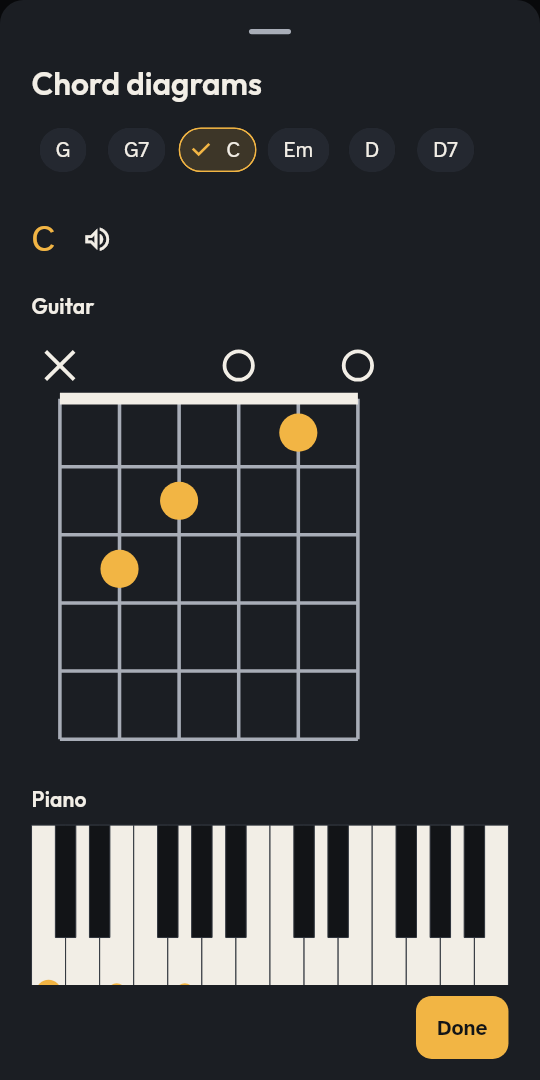
- Chord diagrams for guitar and piano
- Pads and click to rehearse at home
-
Sunday
Everyone on the same verse
The leader opens the live session, the others join with a 4-digit code. Verse, chorus, “again”: everything reaches every device at the same moment, over Wi-Fi, a phone’s hotspot, Bluetooth or the internet.
- Missing songs arrive by themselves
- A Bluetooth pedal moves on
- Pads in the song’s key, click only in the headphones
The whole month, on a tablet
Whoever plans the squads sees the whole month in one grid: who plays, who is away, what is missing. One tap on a cell offers the turn, and everyone’s absences are already there.
Pre-chorus
One tap, and everyone turns the page
The leader taps «Next»: the guitar sees the next verse’s chords, the singers its words, the room its slide. All at the same moment, even offline. Try it here.
Amazing grace! How sweet the soundThat saved a wretch like me!
'Twas grace that taught my heart to fear,And grace my fears relieved;
Through many dangers, toils and snares,I have already come;
Press «Next»
Now with your team: try it in the beta.
Verse 3
The screen for the room, with or without a control desk
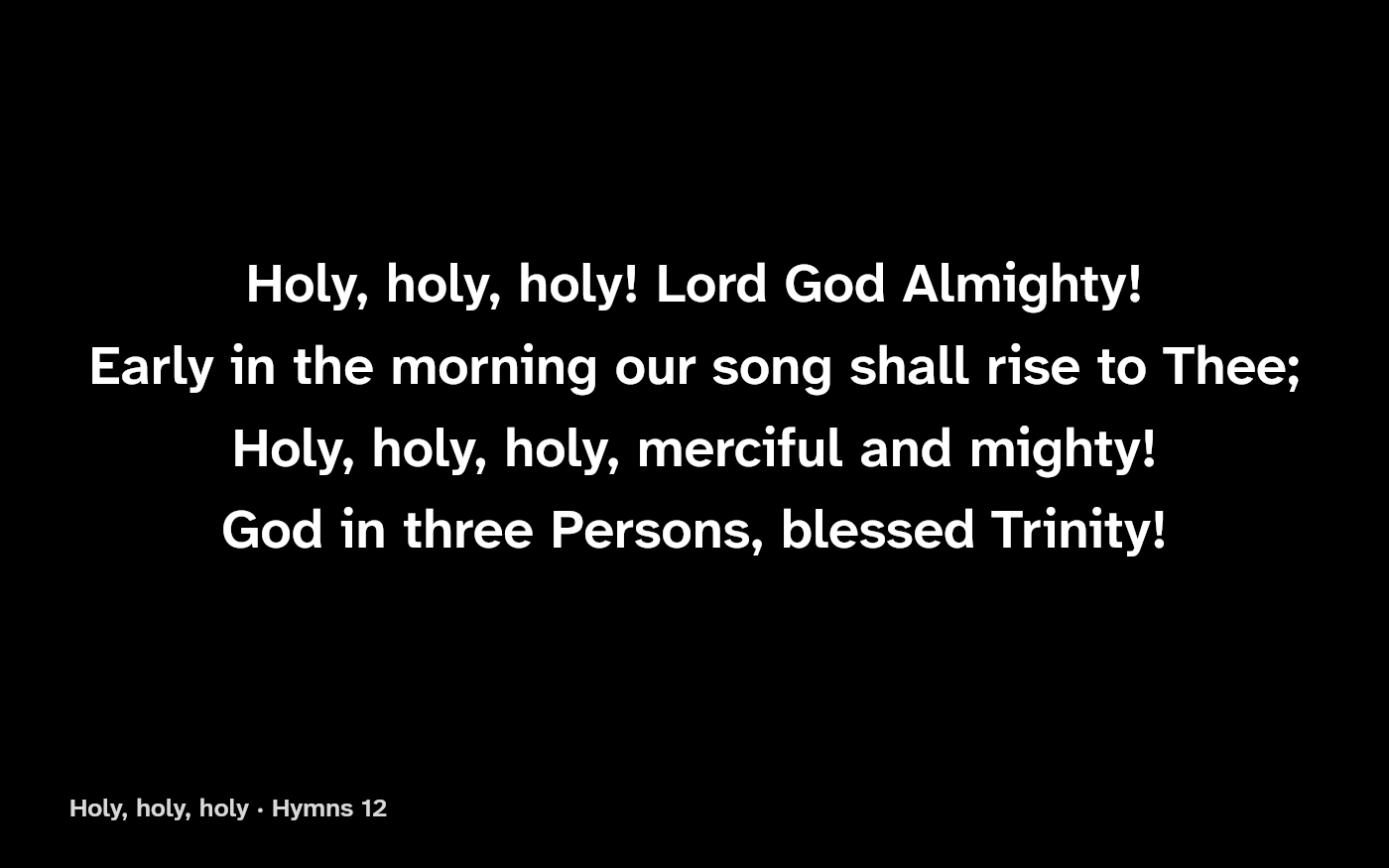
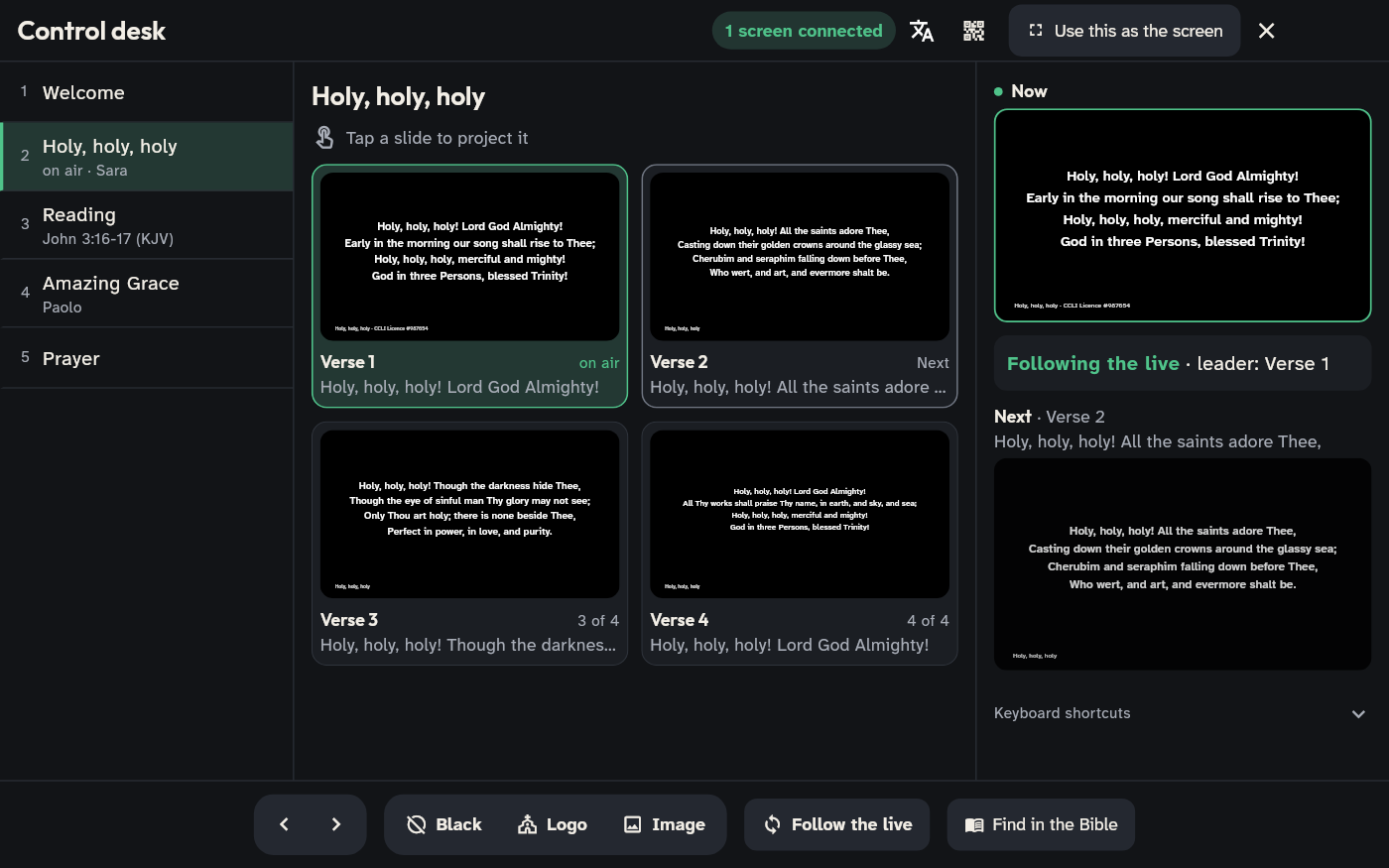
The congregation’s words follow the live session, verse by verse. With nobody at the desk, the leader’s phone takes care of it; with a volunteer, they hold the whole service in their hands: the setlist, every slide and where the leader is.
Without a control desk
The leader’s phone puts the words on screen while they play. Between songs the screen rests, black or with the church’s logo, until the leader taps the verse or presses the pedal.
With a control desk
On a tablet, a laptop or even a phone. Tap an item to look at it without putting it on air, then the right slide. The desk moves only the screen, never the stage; “Follow the live” hooks it back to the leader.
The Bible, right on time
Eight public-domain translations to download once, then offline, or your own. Type “John 3:16-18”: the passage waits off air and goes on screen when the moment comes, with a second translation under each verse if you like.
The screen is a web page, on a computer, a TV or in OBS: with a link over the internet, or on the local network even without internet. How to set it up: the projection guide.
Chorus
What we believe
An app for serving should serve: be clear on stage, respect the people who use it and leave room for what matters.
Made for the stage.
Dark theme, high contrast, large text. What matters takes one tap or one pedal press, even with a guitar on.
Offline first.
Library, setlists and live work without internet. The cloud keeps the team in step, but it is never a condition.
Your songs, your licence.
No songs bundled: you bring your own lyrics, with the CCLI number. We don’t sell songs and we don’t copy them.
Every tradition has its language.
C D E, Do Re Mi or H. Verses in German and the chorus in English. Translations side by side, line by line.
No ads, no tracking.
No hidden analytics, data kept in Europe, account optional. Export everything and delete everything whenever you like.
A team, not a group chat.
Who plays, what we sing and which verse we are on, in one place. You prepare together and play together, not each on your own.
Bridge
Everything else
The other things a team uses every week, from the library at home to the stage.
Your songs, from wherever they are
Bring in what you have: one file at a time or a whole songbook in a zip.
- ChordPro, text with chords, OpenLyrics (OpenLP), OpenSong, OnSong, VideoPsalm
- Write or fix a song in three ways (lyrics, chords, ChordPro), with chords always on the syllable
- PDFs and photos, with lyrics and chord recognition
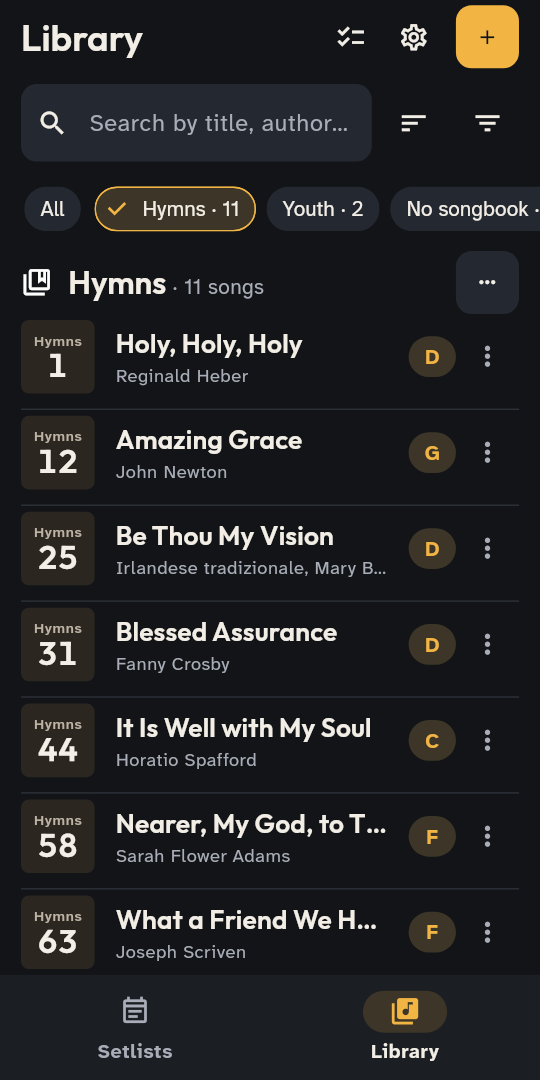
- Numbered songbooks, search by title, author, lyrics or number
- Convert with AI: from a photo or a PDF to lyrics and chords ready to check
One song, two languages
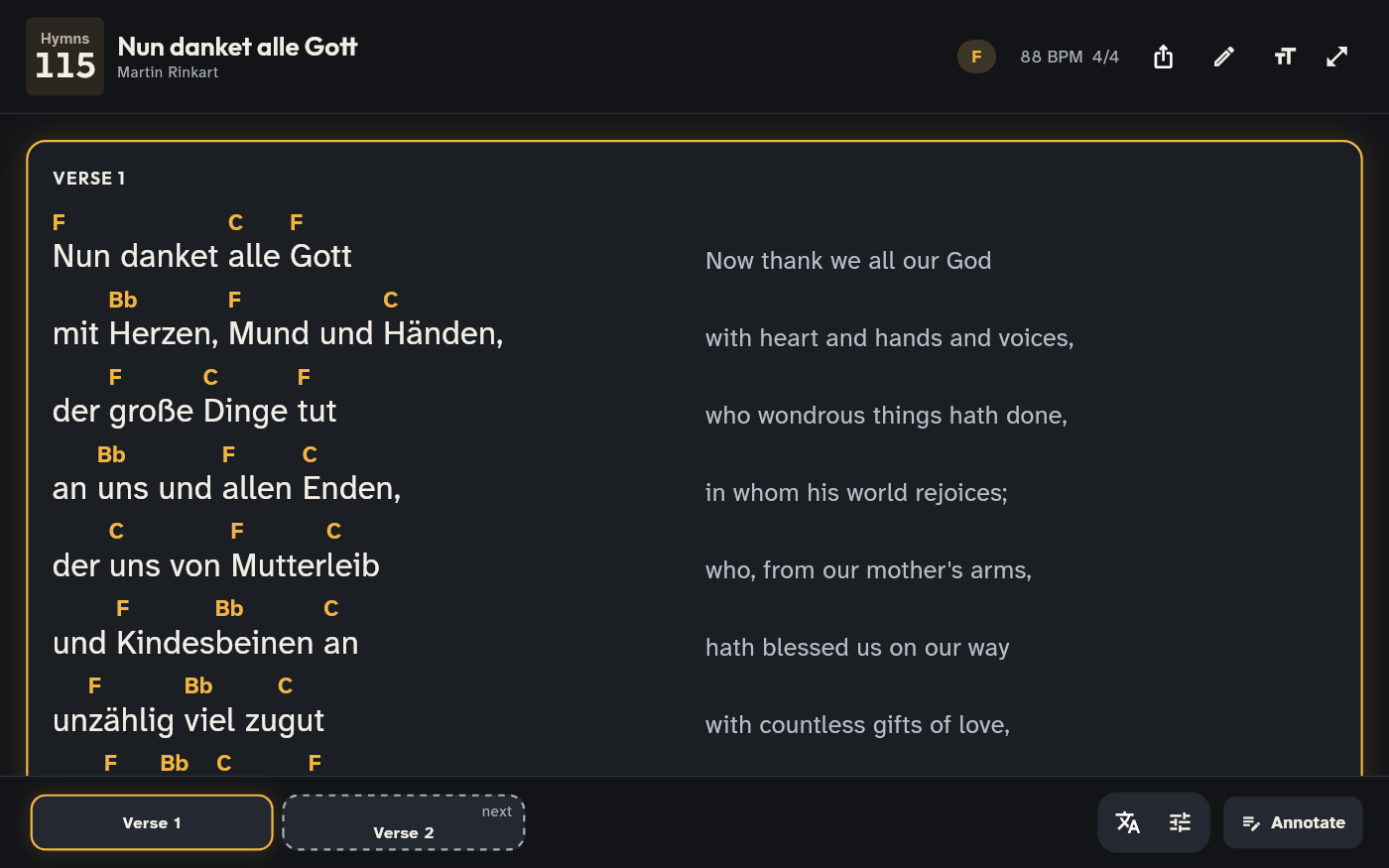
For churches that sing in more than one language: the translation beside the lyrics, line by line, or each section in its own language.
- “Nun danket alle Gott” with Catherine Winkworth’s English translation
On stage, only what you need
The current section lights up, the rest steps back. A Bluetooth pedal moves you on.
- The song map: verses and choruses as blocks, the one being sung lit and the next one marked; tap to jump
- Pads in the song’s key, crossfading to the next; with no key you pick it, and switch set on the fly
- Free pads to download in the app: “Foundations” by Reawaken Hymns, with thanks
- Three levels of text: the current section and the next at full brightness, the rest dimmer; on a phone held sideways too
- Focus: just the lyrics, everything else one tap away (already on, on phones)
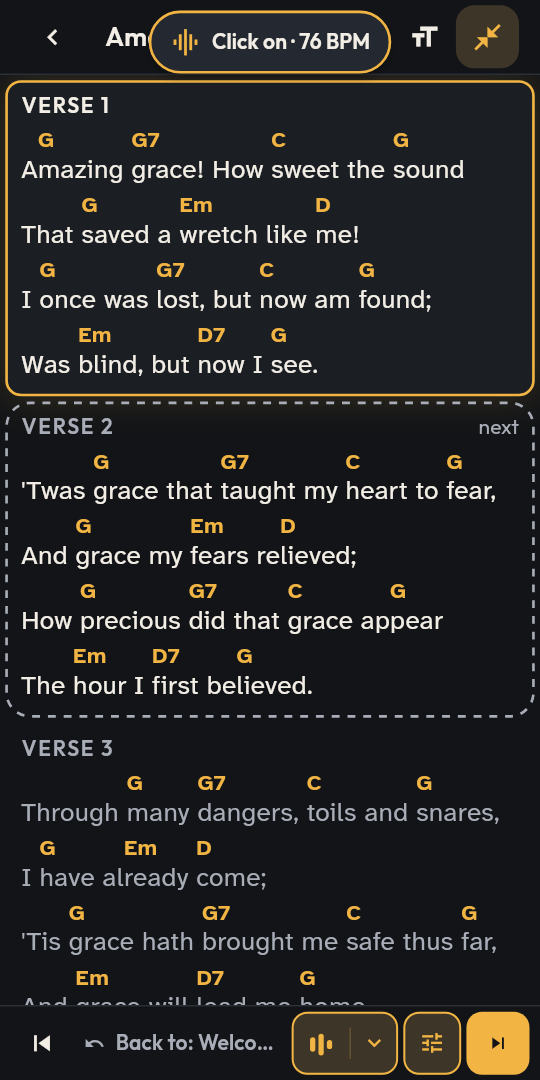
The leader’s stage, on a tablet
A tablet has room for everything: the current verse, the next one, pads and click, and the connected devices.
- Cues for the team: “again”, “end”, “attention”
- Followers join as vocals, guitar or sound, and the leader sees it at once
- Compact view in rows, when the song fits without wrapping
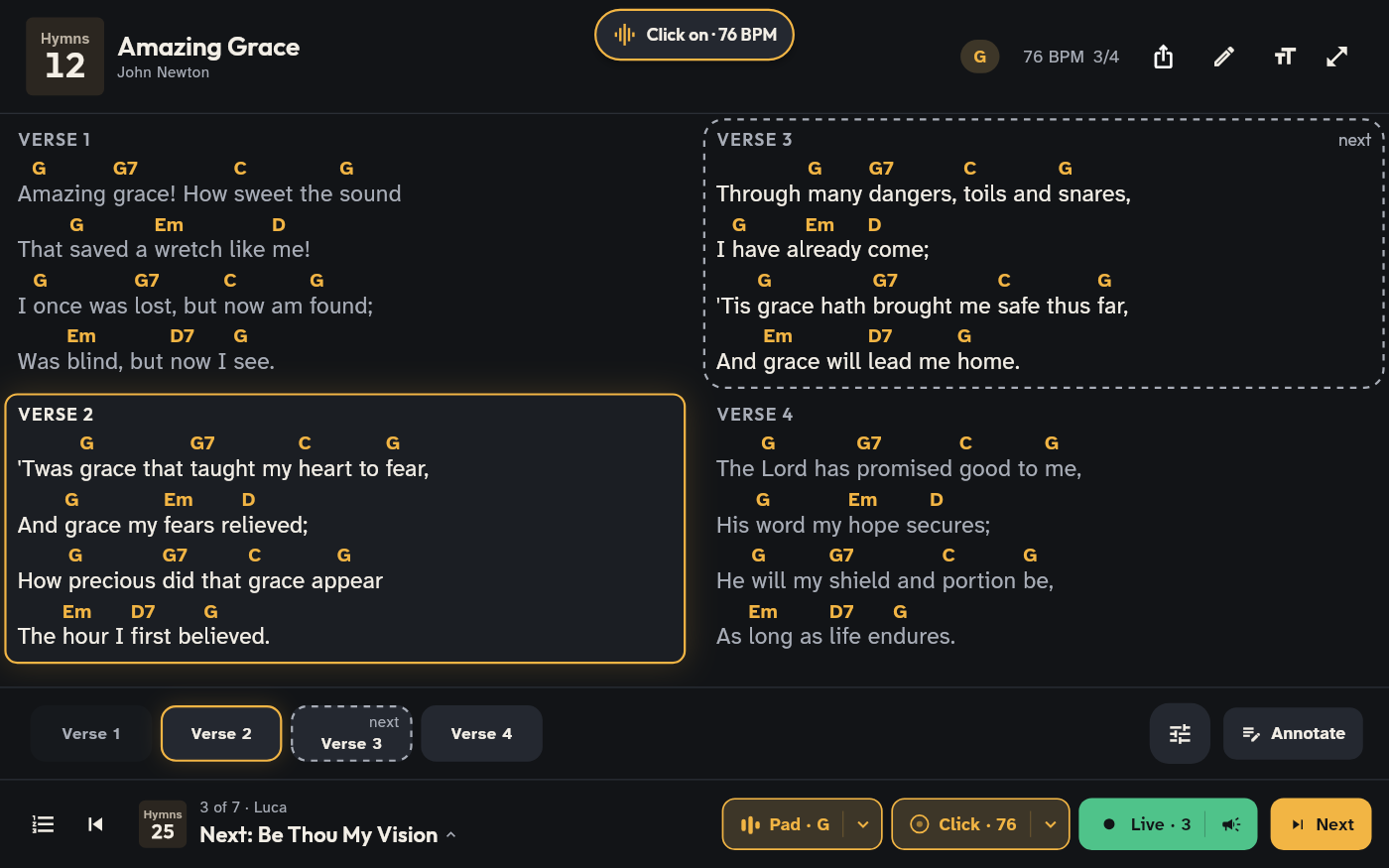
Chords in your language
Transpose with one tap and choose the notation: the chords follow, the lyrics stay the same.
- Capo suggestions with fewer barre chords
- Diagrams for guitar and piano
- A profile for what you do: vocals, guitar, bass, keys, sound desk
Tag
The team’s live is free. For good.
What you need on Sunday comes with no subscription. The leader starts the live on a phone and the others join on the church’s network, or on a phone’s hotspot, or over Bluetooth with no network at all. No limit on people.
Live on the local network
Everyone on the same section, with the leader’s cues: “again”, “end”, “heads up”. Whoever joins late lands in the right place, whoever loses the network rejoins on their own.
The screen for the room
Projection on the local network, with or without a desk: all it takes is the browser of a computer connected to the projector.
Songs in two languages
The translation alongside, line by line, or verse and chorus each in its own language.
C D E, Do Re Mi or H
Chords in your team’s notation, transposed with one tap.
Your songs, from where they already are
ChordPro, OnSong, OpenLP, OpenSong, VideoPsalm, SongBeamer, ProPresenter, PDFs and photos: even a whole songbook in a zip.
Later on, a plan for churches will add the cloud: the team in sync everywhere, live over the internet, rotas and AI conversion. Everything above stays free.
Outro
Try it now
Chenaniah is in testing and free during the test. Bring your team: every comment helps it grow in the right direction.
Android: open test on Google Play
Open the Google Play page and tap “Become a tester”: Chenaniah installs and updates from the store.
Open Google PlayiPhone and iPad: TestFlight
Install TestFlight from the App Store, then open the public link: Chenaniah installs and updates from there.
Open TestFlight